
Key Capability
Detect, diagnose, and resolve sync issues faster
Maintain reliable integrations with built-in monitoring, diagnostics, and recovery tools, so business operations continue without disruption.

How it works with
Visiblity across thousands of integration pairs
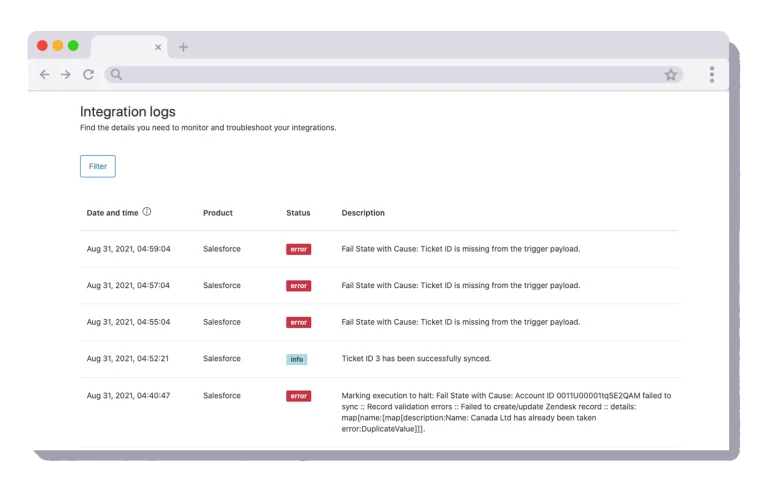
Detailed error diagnostics
Track activity to quickly detect failed transactions or communication issues. Every sync run is logged so you can see what happened, when, and why.
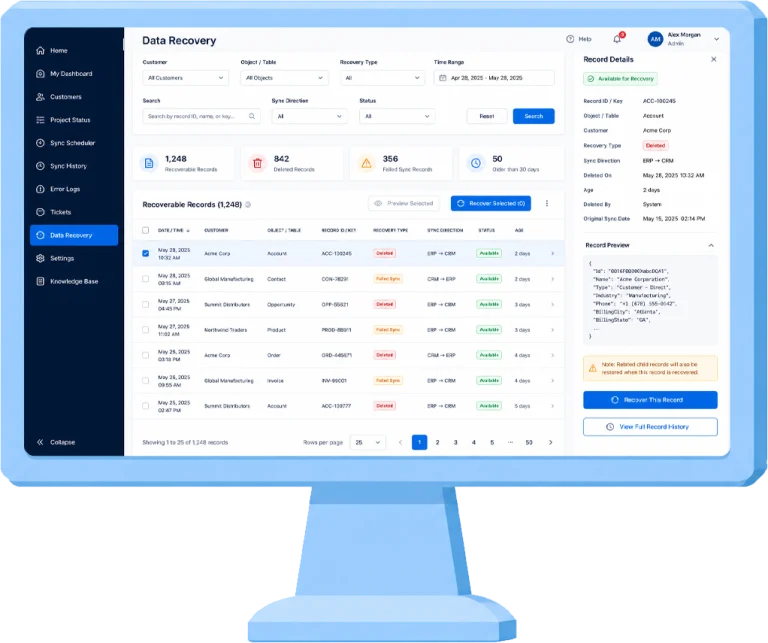
Controlled transaction recovery
Isolate and reprocess failed records without interrupting successful workflows, so one bad record doesn’t stall the rest of the sync.
Frequently asked questions (FAQs)
Visibility into sync failures and tools to resolve issues quickly.
Data formatting issues, authentication problems, and platform-specific constraints.
No, failed transactions are isolated.
Yes, once the underlying issue is corrected.
Your account administrators and Commercient’s support and delivery teams.
No. Monitoring, error logs, and resync tools are included with every SYNC, Pulse, and File SYNC implementation.
Sync activity and failures are visible in your Admin/Customer Panel dashboard. Specific alerts can be configured with your account team.
Yes. Sync history and logs are retained so you can review past activity, not just the current run.


